

When you book a trip, it's important to know who you're actually booking with. KAYAK helps you compare flight options from different airlines, metasearch engines and online travel agencies so you can find what works for you.
Online travel agencies (or OTAs) often offer lower prices, but what’s the catch or is there one? Here are some tips to help you navigate the process. Because you’ve got enough to think about without wondering if your booking is in good hands.
In this article:
- What’s an OTA?
- What’s the catch? Why are OTA flights cheaper?
- What should I check before booking?
- What happens after I’ve booked with an OTA?
- FAQs
What’s an OTA?
An OTA is an online travel agency that sells flights, hotels, cars and travel packages. KAYAK often lists deals from OTAs alongside airlines and hotels.
When you book with an OTA, you are subject to their terms, not the terms of the airline or hotel. This means if you have an issue or need to change your booking, you must contact the OTA.

OTA examples: Expedia, Priceline, Agoda, Hotels.com, Traveluro, BravoFly, Super.com, Cheapflightsfares.
What booking with an OTA through KAYAK might look like.
- Find a good flight deal on KAYAK
- Choose to book with Cheapflightsfares because it offers the lowest price
- Click through to their site
- Check the flight details, including any included baggage
- Add your details
- Pay Cheapflightsfares
Change of plans? In this case, you’d update your reservation through Cheapflightsfares.
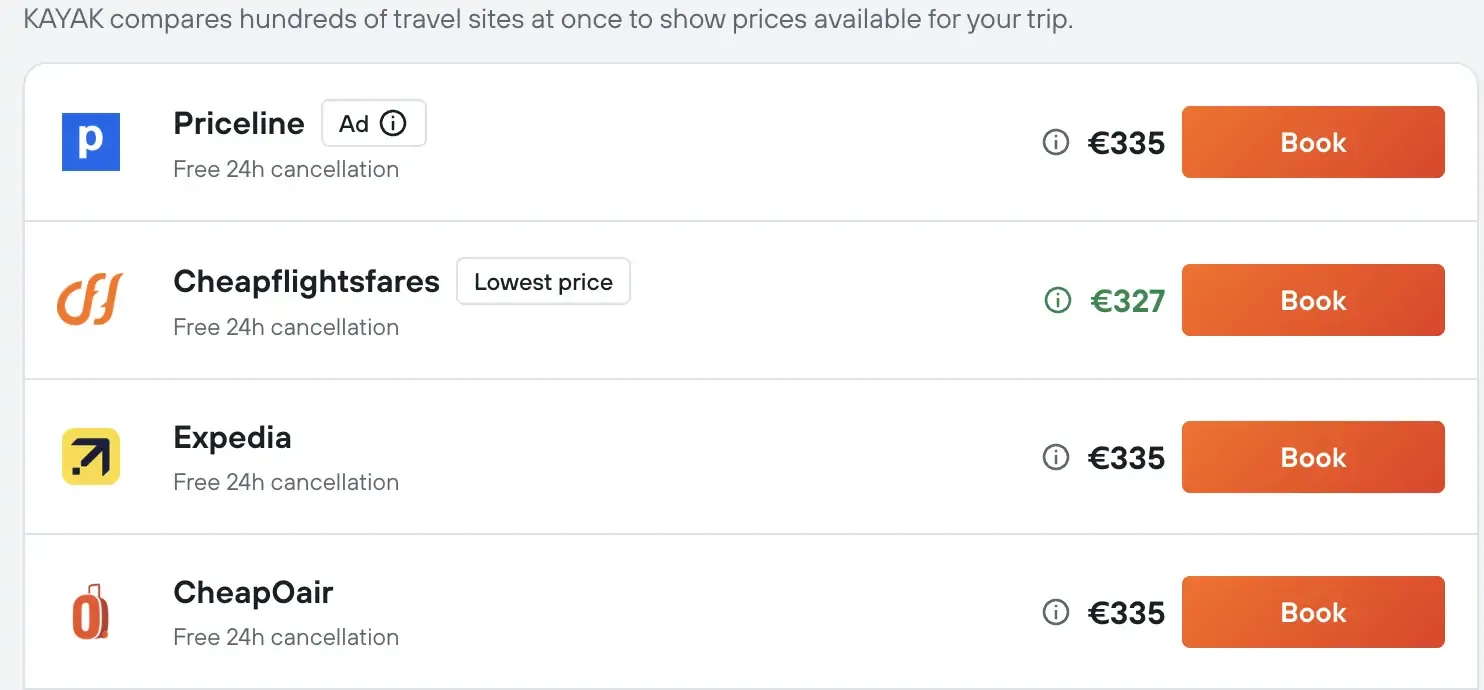
Once you choose your flight, you’ll be presented with booking options, often including OTAs as shown above.
What’s the catch? Why are OTA flights cheaper?
Online travel agencies (OTAs) can offer cheaper flights because they may have negotiated or exclusive fares, bundle flights with hotels or cars or combine separate one-way tickets into a lower-priced itinerary.
The trade-off is that OTA bookings can have different baggage, cancellation, change and customer service policies. Check the final price and terms carefully before booking.
What should I check before booking?
Like any travel booking, check the basics before you book to avoid any hassle, including the dates & correct name spelling (we’ve all made that mistake).
Here are a few other things to check if you’re not sure about the OTA you are about to book with.
Confirm who you’re actually booking with.
As mentioned above, when you compare options on KAYAK, you get to choose who you book with. These options will be clearly laid out and you can pick what works for you. When you click through to book, the website you land on belongs to the booking provider.
How to check if a provider is legit.
We have a team dedicated to vetting partners, but if you want to do your own checks, here are some tips:
- Read online reviews: Trustpilot and Google are reliable sources. Make sure you’re reading reviews for the provider you’re booking with, not for KAYAK.
- Check customer service: If phone support matters to you, confirm the provider lists a contact number.
- Ask around: A friend or family member’s experience can often tell you more than an online review can.
Check the nitty-gritty of booking policies.
Checking booking policies is particularly important if you think your plans might change. A little homework now can save you a travel headache later.
Here’s what to look out for:
- Cancellation policy: Can you cancel your booking for free, or is there a cost?
- Non-refundable rates: Is the booking set in stone?
- Date changes: Do you have the option to switch your dates?
- Baggage policies: Is a free cabin bag included? Is that enough for your trip?
Got a few non-negotiables? When you’re searching, use KAYAK’s filters or Ask AI to narrow down your options, including if you only want to see specific providers (airlines, for example).
What happens after I’ve booked with an OTA?
After booking with an OTA, the OTA (not KAYAK or the airline) holds your reservation. You’ll usually be able to add your booking directly to the relevant airline app too.
You’ll get a confirmation email with your booking reference, ticket details and information on how to manage your booking. Keep this email and booking reference handy, and verify the passenger names, dates, baggage allowance, and cancellation terms.
Other good-to-know information:
- Changes or cancellations: Contact the OTA first for cancellations, changes, refunds, or booking questions. You’ll generally be subject to the OTA’s terms and policies.
- Airline contact: For airport check-in or travel-day issues, the airline may be able to help, but the OTA remains responsible for managing the reservation it sold.

KAYAK Tip: Complete your booking while logged in to KAYAK and you can access them anytime from the bookings section of your profile.
FAQs
OTA, when talking about flights, means Online Travel Agency.
The name on your card should reflect the company you booked with. You’ll always see the provider name, not KAYAK.
You can contact our support team via this support page or chat.