

Flexible date flight search helps you compare airfare across nearby departure or arrival dates to find cheaper flights. At a glance, you’ll be able to see what dates are the cheapest (and what dates to avoid), all by having just a little wiggle room. Here’s how to save using flexible dates.
How to search for flights with flexible dates?
Here are some tools and tips to help you find the cheapest days to fly for your next trip.
Use +/- 3 days flexible dates to get cheaper flights.
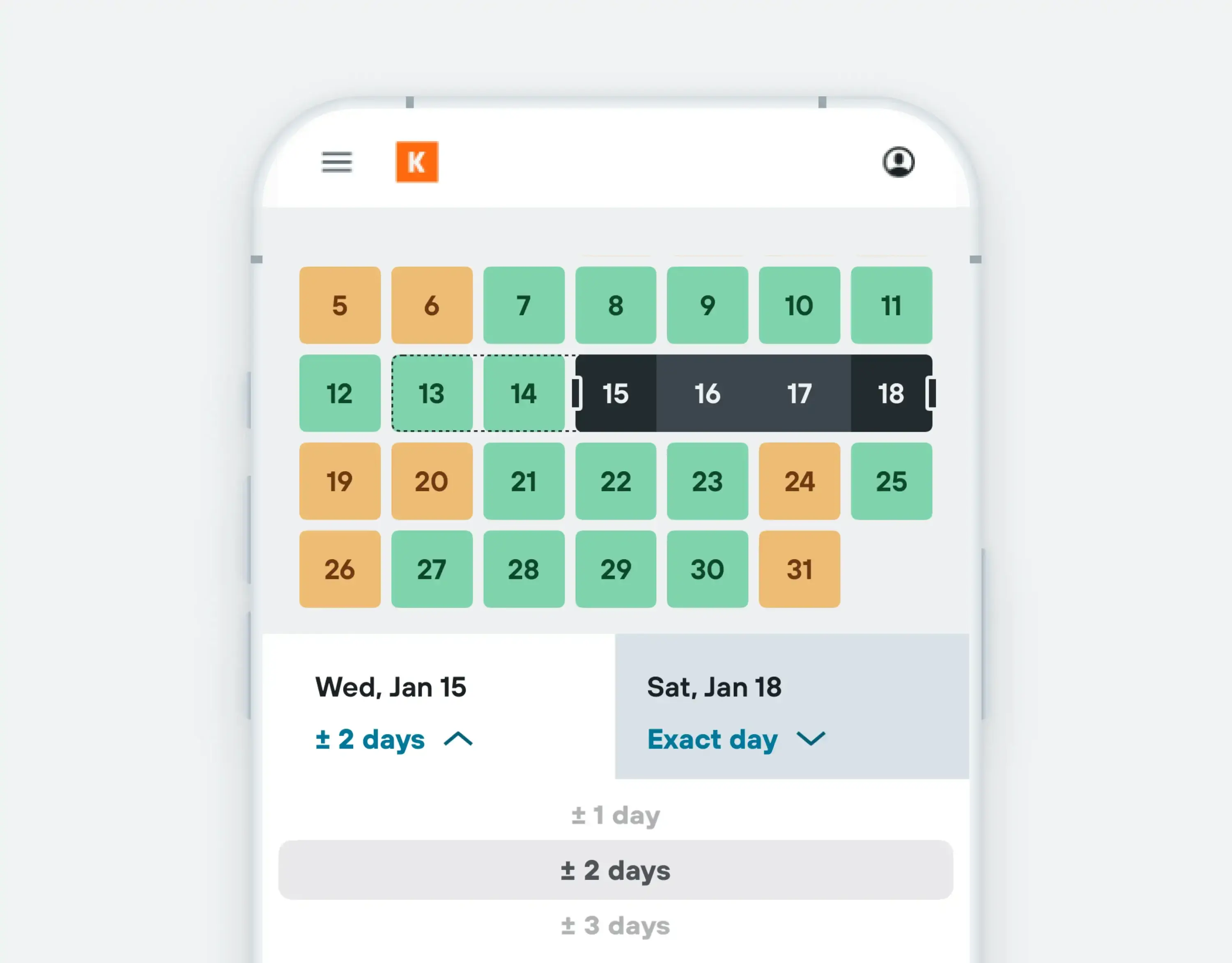
Flexible date search helps you quickly find the cheapest days to fly – saving you time and money. All you need to do is go to KAYAK’s flight search and select your travel dates. Then, choose to search up to 3 days before and after those dates from the drop-down menu.
At a glance, you can then easily compare whether it’s cheaper to fly a few days before or after your intended dates. Say, for example, you are going on a weekend trip, but are equally happy to fly out Friday or Thursday – flexible dates help you search both dates at the same time.
Check the Price Calendar for color-coded insights.
Price Calendar is another good way to quickly find cheaper flights. When you are searching for flights, click into the date field and the color-coded Price Calendar will open up for your chosen month.
The calendar uses KAYAK pricing data to indicate the cheapest and most expensive days to fly. Scroll across months if you want to see further into the future.
- Green signals the cheapest days to fly
- Yellow signals moderate flight prices
- Red signals the most expensive days to fly
On desktop, you’ll see estimated round-trip flight prices for each color at the bottom of the calendar. If you can, pick “green” departure and return dates, and rest easy that you haven’t overpaid.
Compare flights across a full month.
If you know where you want to go, the number of nights you want to be away and the month you’d like to travel, try KAYAK’s ‘month’ search option.
Input the duration of your trip, 4 days, for example, and the month you want to travel. Then hit search. You’ll be shown flight suggestions for your desired trip length within that month. Like Price Calendar, green signals the bes days to travel.
If you’re open to being flexible with your destination too, try Explore.
Ask AI to search flexible dates (and more) for you.
If you are planning a trip and your dates are flexible, but everything is fairly rigid (the number of bags you need, the airline you want to fly with, etc.) try Ask AI.
Add all your requirements to the AI chat on KAYAK and get answers to the details that matter. From baggage rules to layover details, Ask AI surfaces the fine print so you don’t have to.

Here are some example prompts to get you started:
- What are the cheapest weekend flights from Seattle to Los Angeles this May? I need hand luggage and don’t want to fly late at night
- I’m planning a trip with my partner and 2 children to NYC from Austin. We can fly out on June 8 or 9, but need to fly home on June 13. We’ll need a checked bag too and want to fly direct. Find me the best cheap flight options
FAQ
On KAYAK, Flexible Dates means your search can look up to 3 days before and after the travel dates you choose. The section above shows where to find that option and how to use it.
Flexible date flight search works well with Nearby airports because one feature expands your dates and the other expands your airport options. This means you can compare nearby days first and then see whether another nearby airport gives you an even better result.